
Add-ons
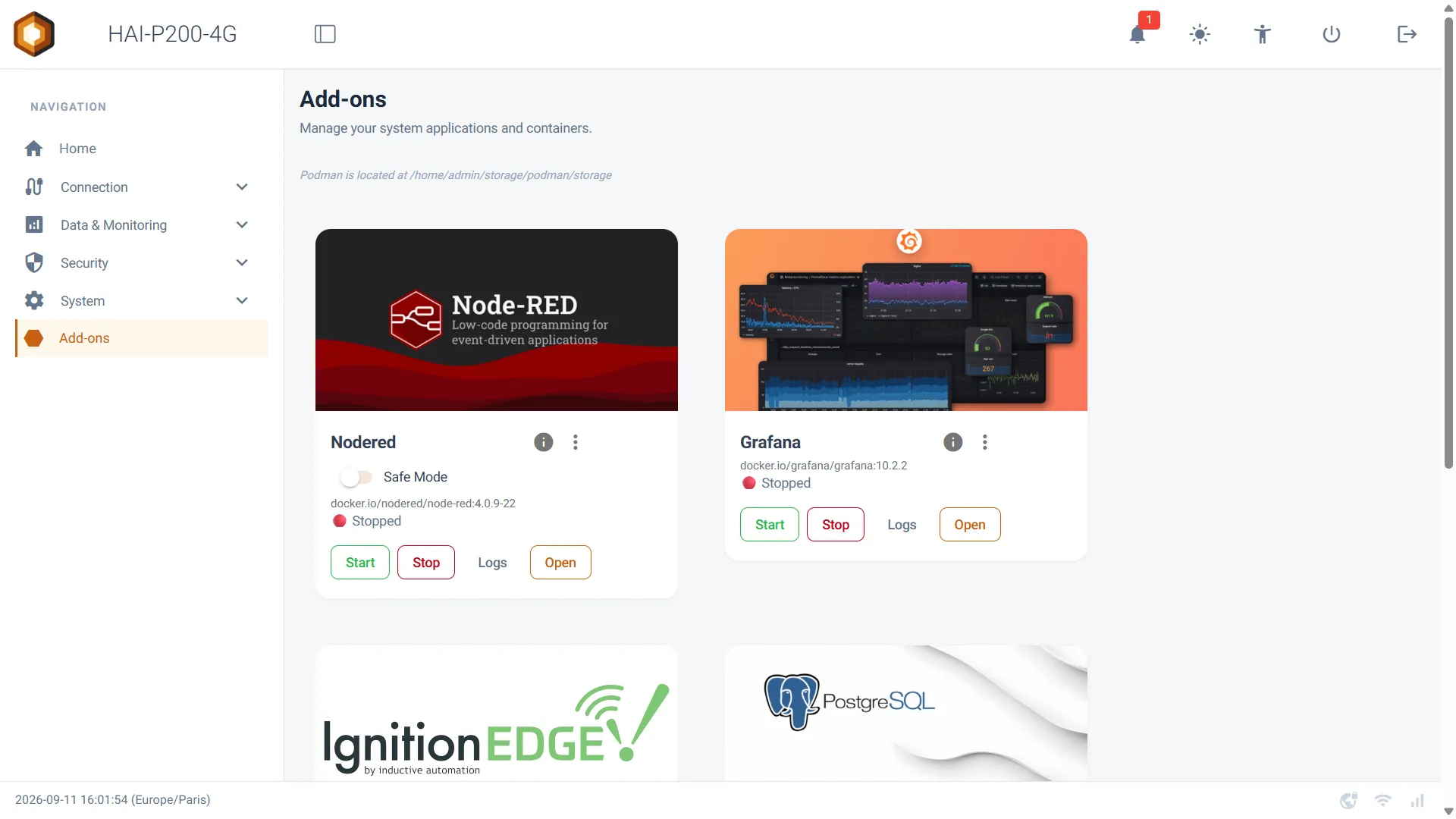
Add-ons are the embedded applications the box can run alongside the firmware: Node-RED, Grafana, Ignition, PostgreSQL and pgAdmin. Each one runs in its own container, isolated from the rest of the system, and is driven entirely from the interface’s Add-ons page — no command line needed.
No add-on is started by default: you only install what you need, which leaves the box’s resources to the others.
1. The catalogue
Section titled “1. The catalogue”| Add-on | What it is for | Access | Versions to choose from |
|---|---|---|---|
| Node-RED | Automation and protocol gateway (Modbus, BACnet, MQTT…). The heart of most installations. | /node-red/ on the interface |
4.0.9, 4.1.13, 5.0.4 |
| Grafana | Dashboards and charts built from the collected data. | port 3000 |
fixed version |
| Ignition | Inductive Automation SCADA platform, Edge edition. | port 8088 |
8.1.47, 8.1.54, 8.3.8 |
| PostgreSQL | Relational database, for historisation. | port 5432 |
fixed version |
| pgAdmin | Web administration interface for PostgreSQL. | port 5050 |
fixed version |
The applications are supplied as they are, packaged with the controller. Hexa-AI does not support their application content (flows, dashboards, queries).
2. Installing and starting
Section titled “2. Installing and starting”Each card offers four buttons:
- Start — installs the add-on if it is not installed yet, then starts it. On the first launch, the image is downloaded from the Internet: allow a few minutes to ten or so depending on your bandwidth (an Ignition image weighs several GB). A message tells you so; leave the page open.
- Stop — stops the container. The data is kept.
- Logs — shows the application’s logs, useful for understanding a start-up that fails.
- Open — opens the application’s web interface in a new tab.
The status shown under the name refreshes by itself: ⏳ Starting, 🟢 Online, 🔴 Stopped.
3. Each card’s ⋮ menu
Section titled “3. Each card’s ⋮ menu”Credentials
Section titled “Credentials”Shows the application’s user name and password. Those passwords are unique to your box: they are generated when it first powers up, appear in no manual and are shared with no other device. This is the only place to consult them — the password is masked by default, one button reveals it and another copies it.
Node-RED has no account of its own: it is protected by your session on the box’s interface.
Backup / Restore
Section titled “Backup / Restore”Backup produces a .tar.gz archive of all the application’s data (Node-RED
flows, Grafana dashboards, Ignition project, PostgreSQL database…), downloaded
to your computer. Worth doing before any significant intervention.
Restore puts a previously downloaded archive back in place.
Version
Section titled “Version”For Node-RED and Ignition, you can choose the application’s version. The new image is downloaded at the next start (Internet required), and if the add-on is already online it restarts immediately.
Your data is kept across a version change — but an older version may refuse to read back data written by a newer one. Take a backup before going back.
Uninstall
Section titled “Uninstall”Stops the add-on and deletes the downloaded images to recover disk space. It is the right reflex after a version change: otherwise the old image stays on the disk.
An “Also delete saved data” switch is offered:
- off (the default): flows, dashboards and settings are kept, and picked up again on reinstallation;
- on: they are destroyed, with no recovery outside a backup.
Reinstalling means downloading the image again, so having an Internet connection.
4. Node-RED’s Safe mode
Section titled “4. Node-RED’s Safe mode”The Node-RED card carries a Safe Mode switch. Turned on, Node-RED starts with its flows loaded but not running: the editor opens normally and you can fix the offending flow without it running.
It is the way out when a flow loops or saturates the box. Once the fix is made, turn the switch off and restart the add-on with Stop then Start.
5. Where the data is stored
Section titled “5. Where the data is stored”At the top of the page, a line says where Podman — the container engine — stores the add-ons’ images and data.
If a micro SD card is present and formatted as ext4, everything is stored there, which spares the box’s internal memory. A card formatted as exFAT or FAT32 cannot host the containers: the box then falls back to its internal disk and says so explicitly, in orange, under the path.
Keep an eye on the space available: every image version already downloaded takes up room until an Uninstall frees it.
6. Limits to know about
Section titled “6. Limits to know about”- Node-RED cannot open a port below 1024 — Modbus/TCP listening on port 502, in particular, will not work. Ports 1880 (the editor) and 47808 (BACnet) are unaffected. The restriction is deliberate: it stops a flow from obtaining the box’s administrator rights.
- Node-RED’s resources are capped (768 MB of memory, 2 cores out of 4). A runaway flow is stopped by that ceiling instead of bringing the whole box down.
- The box only has 4 GB of memory: running Ignition, Grafana, PostgreSQL and pgAdmin at the same time is not realistic. Start what you actually use.