
Hardware guide
1 Hardware guide
Section titled “1 Hardware guide”This chapter presents an overview of the product, the packing list, the appearance, the buttons, the indicators and the interfaces.
1.1 Overview
Section titled “1.1 Overview”The HAI-P200-4G is an industrial PC based on the Raspberry Pi CM4, with 4 GB of RAM and 32 GB of eMMC storage.
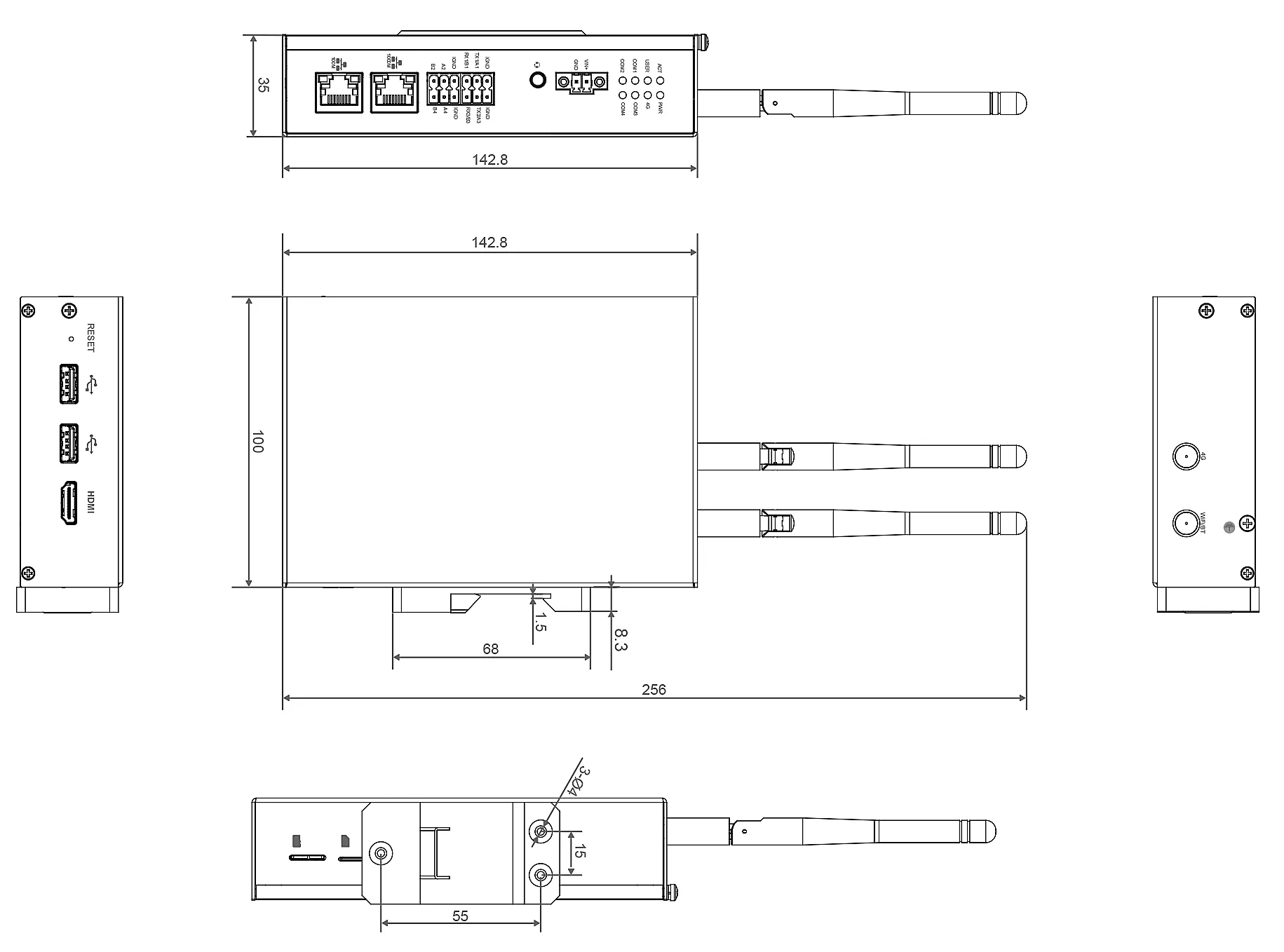
The HAI-P200-4G carries the usual interfaces (HDMI, USB, Ethernet, RS232, RS485) and supports network connections over WiFi, Ethernet and 4G. The addition of a supercapacitor (backup power, optional), an RTC (real-time clock), a watchdog, an EEPROM and an encryption chip guarantees ease of use and high reliability, suited to industrial control and IoT applications.
1.2 Packing list
Section titled “1.2 Packing list”- 1x HAI-P200-4G unit
- 1x 4G antenna
- 1x WiFi antenna
- 1x 2-contact pluggable power terminal block (screw terminal)
- 2x 6-contact pluggable RS232/RS485 terminal blocks (spring terminals)
1.3 Appearance
Section titled “1.3 Appearance”A description of the functions and interface definitions on each face.
1.3.1 Front face
Section titled “1.3.1 Front face”| No. | Function |
|---|---|
| 1 | 1 system status indicator (green) to check the operating state. |
| 2 | 1 user indicator (green), customisable to suit the application. |
| 3 | 1 power indicator (red) to check the on/off state. |
| 4 | 1 4G indicator (green) to check the 4G signal status. |
| 5 | 4 UART indicators (green) to check the communication status of the UART ports. |
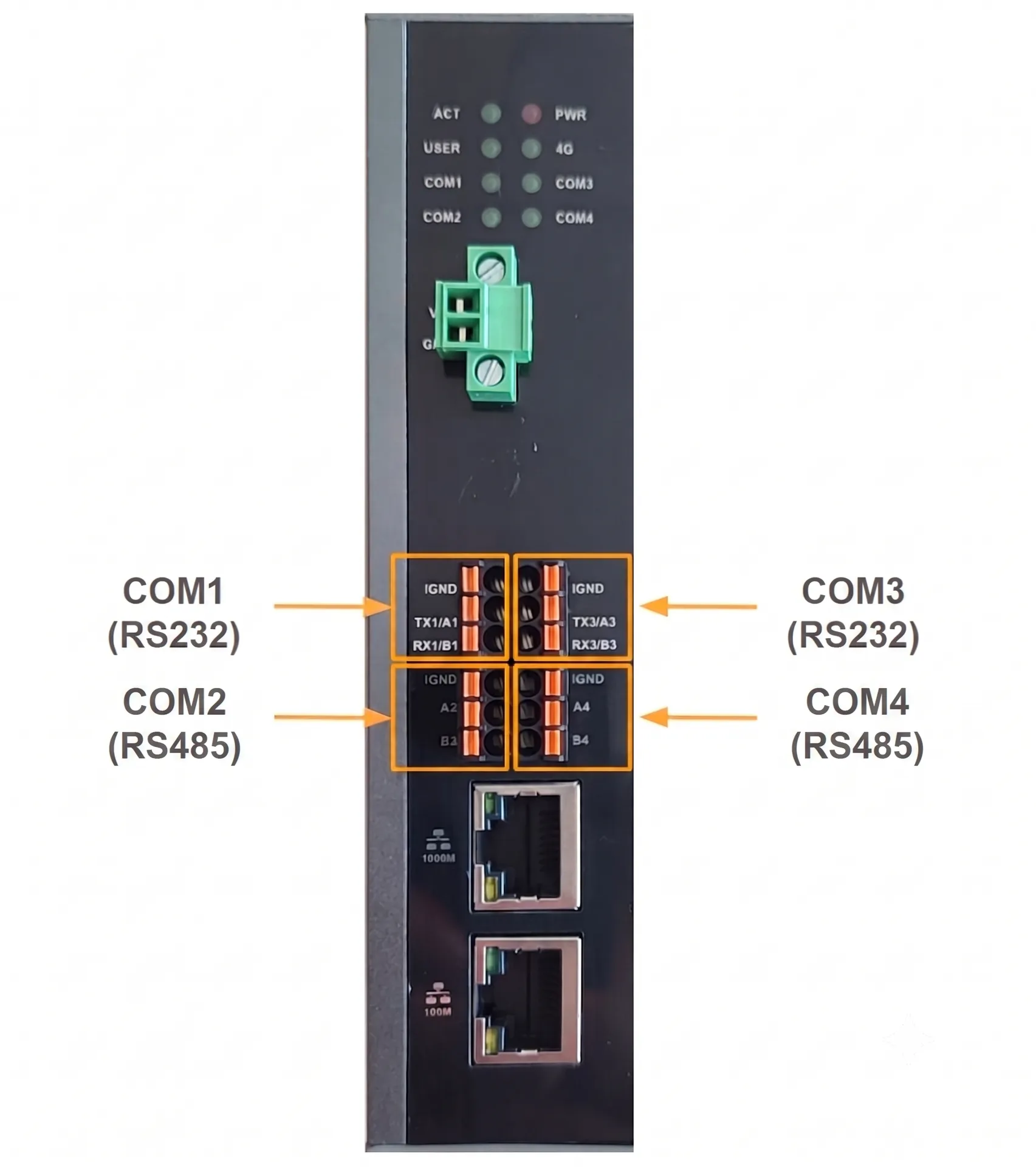
| 6 | DC input (9–36 V): 2-pin terminal blocks (3.5 mm pitch). Pins defined as VIN+/GND. |
| 7 | 2 RS232 ports (6-pin terminal blocks) |
| 8 | 2 RS485 ports (6-pin terminal blocks). |
| 9 | 1 10/100/1000 M Ethernet port (RJ45) with LED indicator |
| 10 | 1 10/100 M Ethernet port (RJ45) with LED indicator |
1.3.2 Rear face
Section titled “1.3.2 Rear face”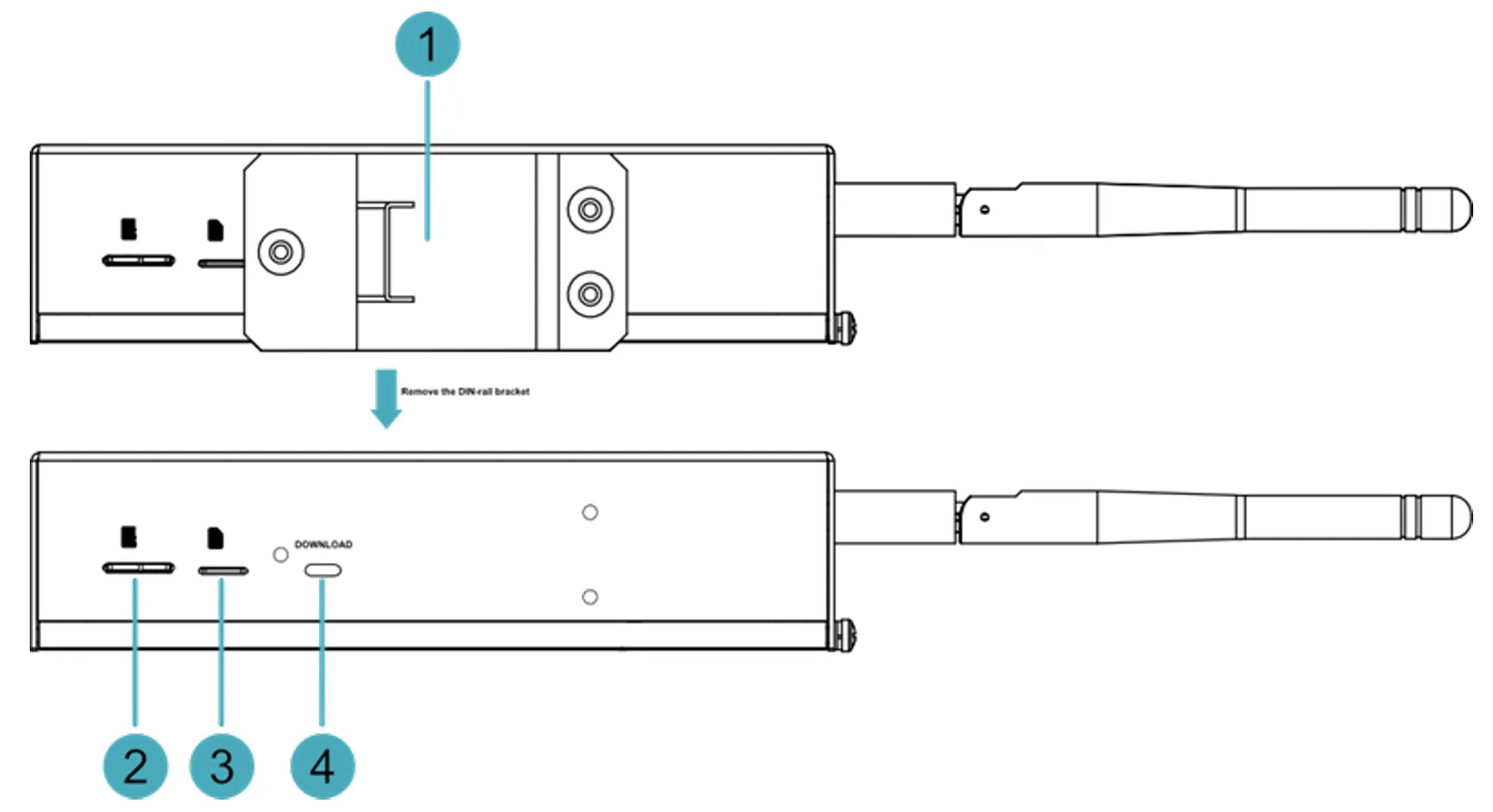
| No. | Function |
|---|---|
| 1 | 1 DIN rail bracket to fix the HAI-P200-4G unit on a rail. |
| 2 | 1 micro-SD slot to install an SD card (user data storage). |
| 3 | 1 nano-SIM slot to install a SIM card (4G signal reception). |
| 4 | 1 micro-USB port to flash the system onto the eMMC. |
1.3.3 Side face
Section titled “1.3.3 Side face”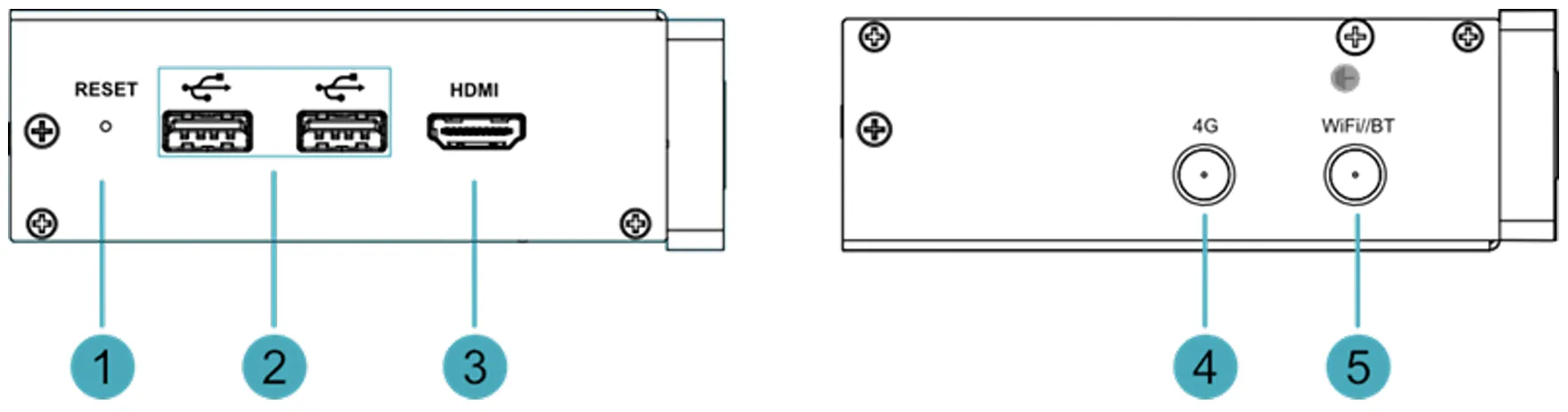
| No. | Function |
|---|---|
| 1 | 1 reset button. Press it to restart the device. |
| 2 | 2 USB 2.0 ports (Type A) with throughput up to 480 Mbps. |
| 3 | 1 HDMI port (Type A), HDMI 2.1 compatible, supporting 4K at 60 Hz. |
| 4 | 1 4G antenna port (SMA connector). |
| 5 | 1 WiFi/BT antenna port (SMA connector). |
1.4 Button
Section titled “1.4 Button”The HAI-P200-4G includes a RESET button, marked “RESET” under the enclosure. Pressing this button performs a power restart.
1.5 Indicators
Section titled “1.5 Indicators”An overview of the various states and meanings of the HAI-P200-4G’s indicators.
| Indicator | State | Description |
|---|---|---|
| PWR (power) | On | The device is powered. |
| Blinking | Abnormal power supply. Unplug it immediately. | |
| Off | The device is not powered. | |
| ACT (activity) | Blinking | The system has booted and is reading/writing data. |
| Off | The device is off or idle. | |
| USER | On | State customisable by the user. |
| Off | Not defined, or device off. | |
| 4G | On | 4G connection active. |
| Off | No 4G signal, or device off. | |
| Ethernet (yellow) | On | Abnormal data transmission. |
| Blinking | Data being transmitted. | |
| Off | No Ethernet connection. | |
| Ethernet (green) | On | Normal Ethernet connection. |
| Blinking | Abnormal Ethernet connection. | |
| Off | No Ethernet connection. | |
| COM1~COM4 | On/blinking | Data being transmitted. |
| Off | No transmission, or device off. |
1.6 Interfaces
Section titled “1.6 Interfaces”An overview of the definition and function of each of the product’s interfaces.
1.6.1 Card slots
Section titled “1.6.1 Card slots”The HAI-P200-4G includes:
- An SD card slot (micro-SD) for data storage.
- A nano-SIM card slot for the 4G connection.
1.6.1.1 SD card slot
Section titled “1.6.1.1 SD card slot”The micro-SD slot takes an SD card to store user data.
1.6.1.2 SIM card slot
Section titled “1.6.1.2 SIM card slot”The nano-SIM slot takes a SIM card to receive the 4G signal.
1.6.2 Power interface
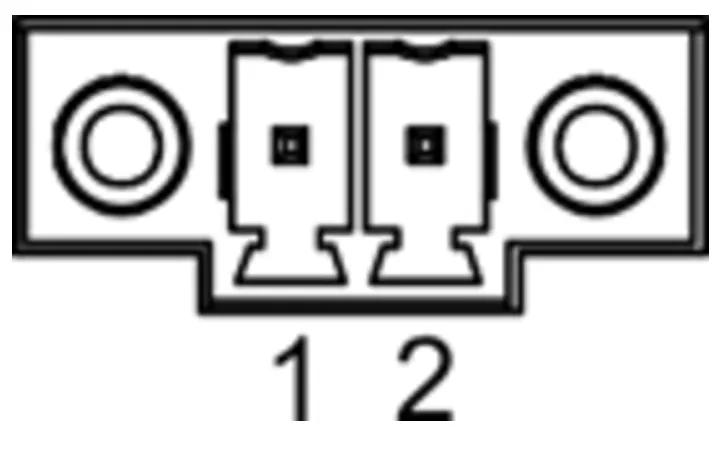
Section titled “1.6.2 Power interface”The HAI-P200-4G includes a DC power input (9–36 V) through 2-pin Phoenix terminal blocks (3.5 mm pitch). The pins are defined as follows:
| Pin | Name |
|---|---|
| 1 | GND |
| 2 | 9 V to 36 V |
1.6.4 RS485/RS232 interface
Section titled “1.6.4 RS485/RS232 interface”The device includes 2 RS485 ports and 2 RS232 ports (6-pin terminal blocks). Configuration by model: 2x RS485 + 2x RS232
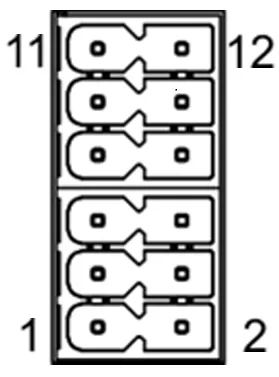
| No. | Function |
|---|---|
| 1 | RS485-B2 |
| 2 | RS485-B4 |
| 3 | RS485-A2 |
| 4 | RS485-A4 |
| 5 | GND |
| 6 | GND |
| 7 | RS232-RX1 |
| 8 | RS232-RX3 |
| 9 | RS232-TX1 |
| 10 | RS232-TX3 |
| 11 | GND |
| 12 | GND |
Cable connection
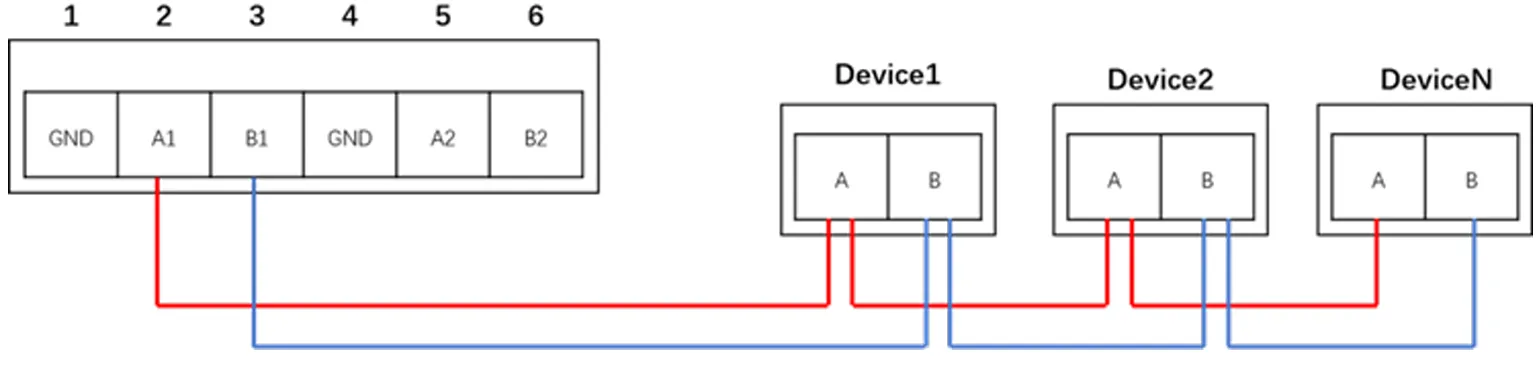
The RS485 wiring diagram is as follows:
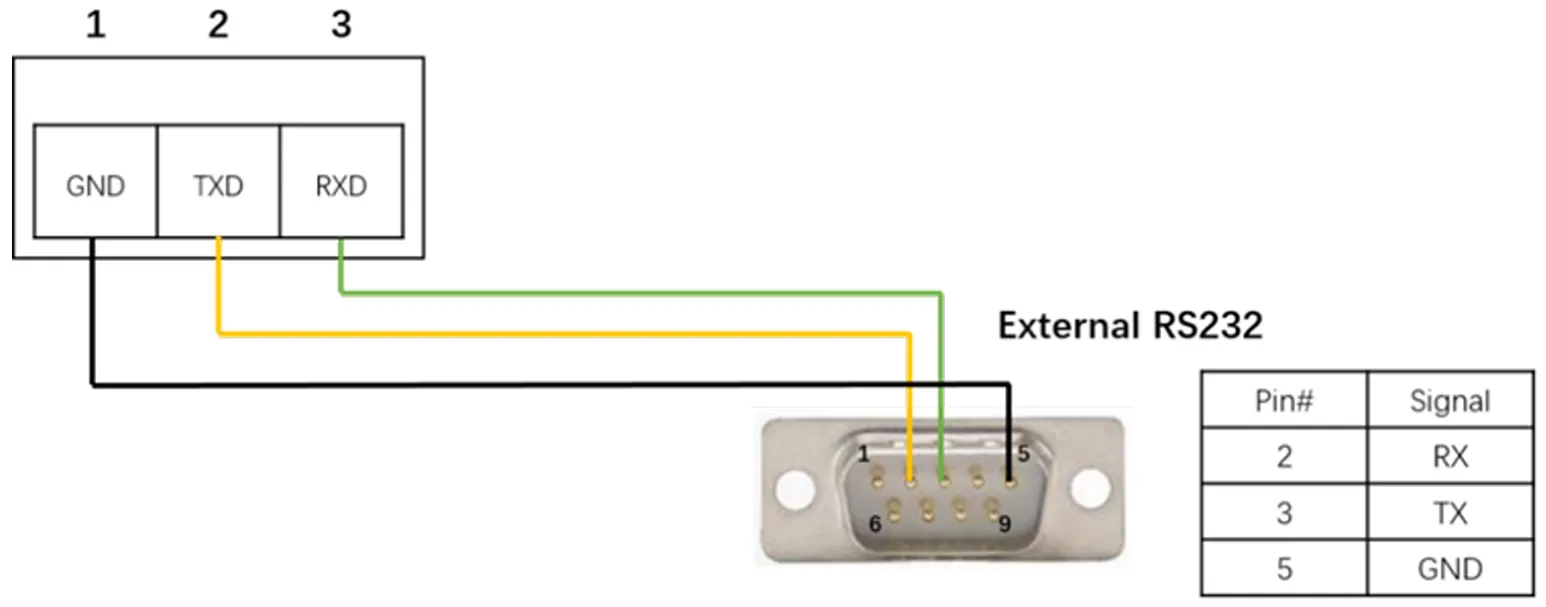
The RS232 wiring diagram is as follows:
1.6.5 1000M Ethernet port
Section titled “1.6.5 1000M Ethernet port”The HAI-P200-4G includes an adaptive 10/100/1000M Ethernet port. The connector is an RJ45 and supports PoE with an extension module. Use a Cat6 network cable or better.
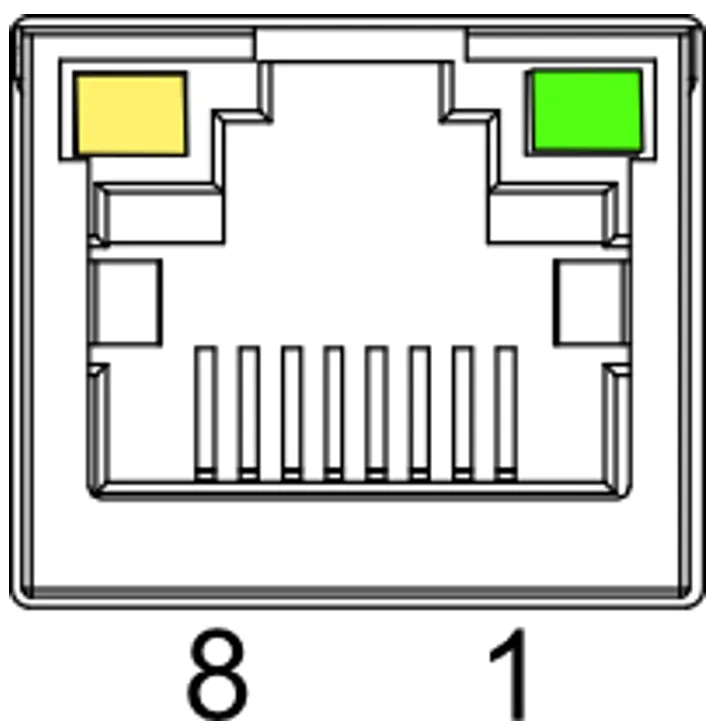
| Pin | Name |
|---|---|
| 1 | TX1+ |
| 2 | TX1- |
| 3 | TX2+ |
| 4 | TX2- |
| 5 | TX3+ |
| 6 | TX3- |
| 7 | TX4+ |
| 8 | TX4- |
1.6.6 100M Ethernet port
Section titled “1.6.6 100M Ethernet port”An adaptive 10/100M Ethernet port (RJ45 connector). Use a Cat6 network cable or better.
| Pin | Name |
|---|---|
| 1 | TX+ |
| 2 | TX- |
| 3 | RX+ |
| 4 | – |
| 5 | – |
| 6 | RX- |
| 7 | – |
| 8 | – |
1.6.7 HDMI port
Section titled “1.6.7 HDMI port”A type A HDMI port, marked HDMI, supporting resolutions up to 4Kp60.
1.6.8 USB 2.0 ports
Section titled “1.6.8 USB 2.0 ports”2 type A USB 2.0 ports, maximum throughput 480 Mbps.
1.6.9 Micro-USB port
Section titled “1.6.9 Micro-USB port”A marked micro-USB port, to connect the device to a PC and flash the system onto the eMMC.
1.6.10 Antenna ports
Section titled “1.6.10 Antenna ports”2 SMA antenna ports:
- Marked 4G: for the 4G antenna.
- Marked WiFi/BT: for the WiFi/Bluetooth antenna.
1.6.11 RTC battery holder
Section titled “1.6.11 RTC battery holder”The motherboard embeds an RTC (real-time clock).

The RTC guarantees a reliable, uninterrupted clock, even during a power cut.
2 Installing the device
Section titled “2 Installing the device”This chapter explains how to install the device.
2.1 DIN rail installation
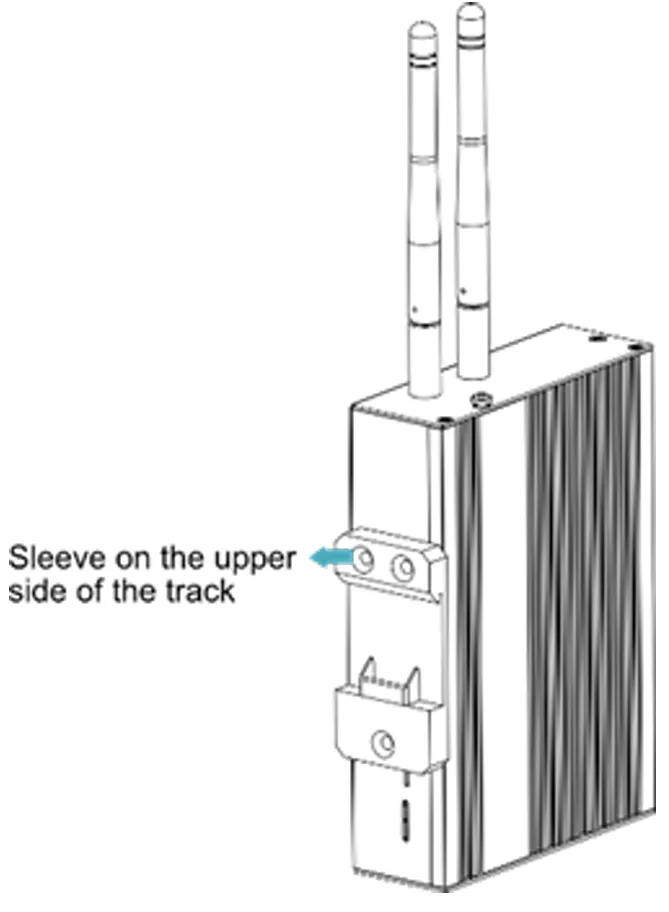
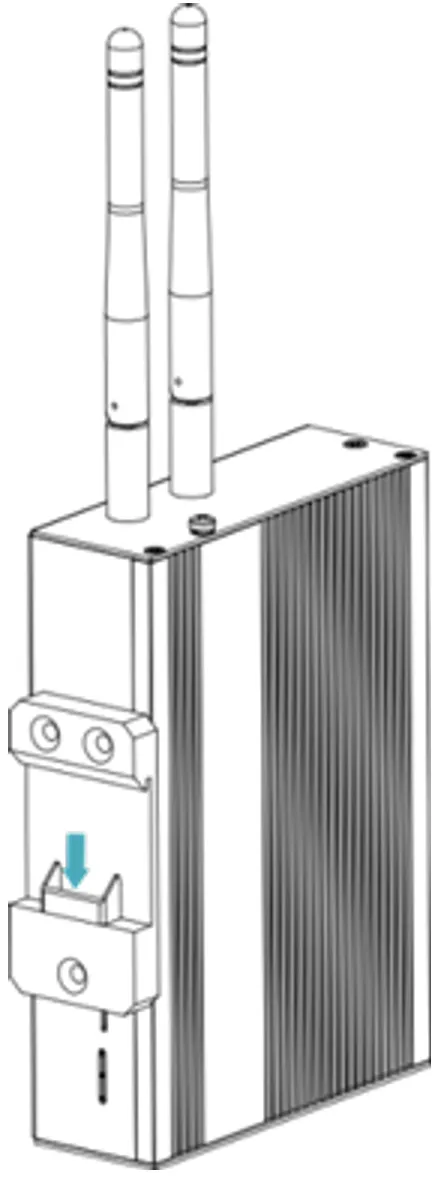
Section titled “2.1 DIN rail installation”The HAI-P200-4G ships with a DIN rail bracket pre-installed by default.
Steps:
-
Position the DIN rail bracket’s side facing the rail to install it on. Slide the upper part of the bracket onto the rail’s upper edge.
-
Press the locking tab on the lower part of the bracket until it clicks onto the rail.
Note:
- No additional tool is required for this installation.
- The DIN rail fixing guarantees optimal stability in an industrial environment.
4 Starting the device
Section titled “4 Starting the device”4.1 First system start
Section titled “4.1 First system start”The HAI-P200-4G has no power switch. The system starts automatically once power is applied.
Indicators:
- PWR (red): on = normal power supply.
- ACT (green): blinking = successful start.