
MQTT API
The internal MQTT broker of your HAI-P200-4G controller does not only carry your equipment’s data. It also acts as a genuine local API, letting you drive the box’s system functions straight from your applications (Node-RED, the CODESYS runtime, or any other local MQTT client).
This guide lists every “command topic” HAI-OS subscribes to, along with the message formats (payloads) it expects.
Prerequisites
Section titled “Prerequisites”-
The HAI-P200-4G controller
-
HAI-OS
1. Power control (reboot & shutdown)
Section titled “1. Power control (reboot & shutdown)”You can trigger a clean restart or a full shutdown of the controller through simple MQTT requests.
-
Reboot the system
-
Topic: service/reboot
-
Payload: (the message content does not matter — you can send “1”, “true” or empty text).
-
Action: HAI-OS intercepts the message and immediately runs the system command sudo reboot.
-
-
Shut the system down
-
Topic: service/shutdown
-
Payload: (content ignored).
-
Action: the system starts the shutdown procedure (sudo shutdown -h now), which stops the services and freezes the file system before power is cut.
-
2. Driving historisation (Data-Plug)
Section titled “2. Driving historisation (Data-Plug)”By default, the Data-Plug records (historises) data continuously in its local SQLite database (the Store & Forward mechanism). You can pause that recording programmatically — to avoid filling the database with meaningless values while a machine is under maintenance, for example.
-
Pause historisation
-
Topic: service/dataplug/record/stop
-
Payload: (content ignored).
-
Action: forces an immediate “commit” (save) of the in-memory data to disk, then suspends the recording of incoming data. (The interface’s “Historization (On/Off)” button visibly switches to “Off”.)
-
-
Resume historisation
-
Topic: service/dataplug/record/start
-
Payload: (content ignored).
-
Action: re-enables recording data to the database.
-
3. SMS communication (sending & receiving)
Section titled “3. SMS communication (sending & receiving)”If your HAI-P200-4G box has a valid SIM card and the modem is configured, you can use MQTT to send and receive SMS messages. This is particularly useful from Node-RED, to build custom alerts.
Sending an SMS
Section titled “Sending an SMS”To send a text message to a mobile phone:
-
Topic: service/sms/send
-
Expected payload (strict JSON format):
JSON
{ "number": "+33612345678", "message": "Alert: tank level low!" }(Note: make sure you use the international format for the phone number — +33 for France, for example.)
Listening for incoming SMS
Section titled “Listening for incoming SMS”Conversely, if someone sends an SMS to the controller’s SIM number, the system reads it, erases it from the modem’s memory, and publishes it on the MQTT broker.
-
Topic (to listen to): service/sms/received
-
Generated payload (JSON format):
JSON
{ "number": "+33612345678", "message": "Text of the SMS received" }(In Node-RED, you can use an mqtt in node subscribed to that topic to trigger actions — for example: if the message contains the word “STATUS”, reply with an SMS giving the machine’s state.)
4. Listening to sensor data (telemetry)
Section titled “4. Listening to sensor data (telemetry)”The Data-Plug unifies every piece of collected data (whatever its original protocol: Modbus, OPC-UA, S7, BACnet/IP and Internal MQTT (Node-RED)) and publishes it in real time on the internal MQTT broker, through the Telegraf engine for some protocols. This lets you intercept any value and build your own processing logic.
Topic structure The system organises the data hierarchically so you can easily filter what you want to listen to:
-
Listen to absolutely every piece of data: data/all/#
-
Listen to favourite variables only: data/favorites/#
-
Detailed structure of a topic: data/all/
/<variable_name>/<alarm_level> (examples: data/all/measure/Motor_Temperature/default or data/all/alarm/Pump_Fault/error)
Message format (payload) Data is published in a standardised JSON format. The raw value read from your equipment is always in the fields object, under the value key.
Example of a generated MQTT payload:
JSON
{ "fields": { "value": 42.5 }, "name": "Motor_Temperature", "tags": { "category": "measure", "unit": "°C", "favorite": "true" }, "timestamp": 1710425000000}Integration in Node-RED In the Node-RED application included on the controller, just drag an mqtt in node in, connect it to the local broker (localhost on port 1883), and subscribe to the topic you want (data/all/#, for example).
If you set the MQTT node to parse the JSON automatically (Output: a parsed JSON object), you can extract your sensor’s value directly in the following nodes, using the path msg.payload.fields.value.
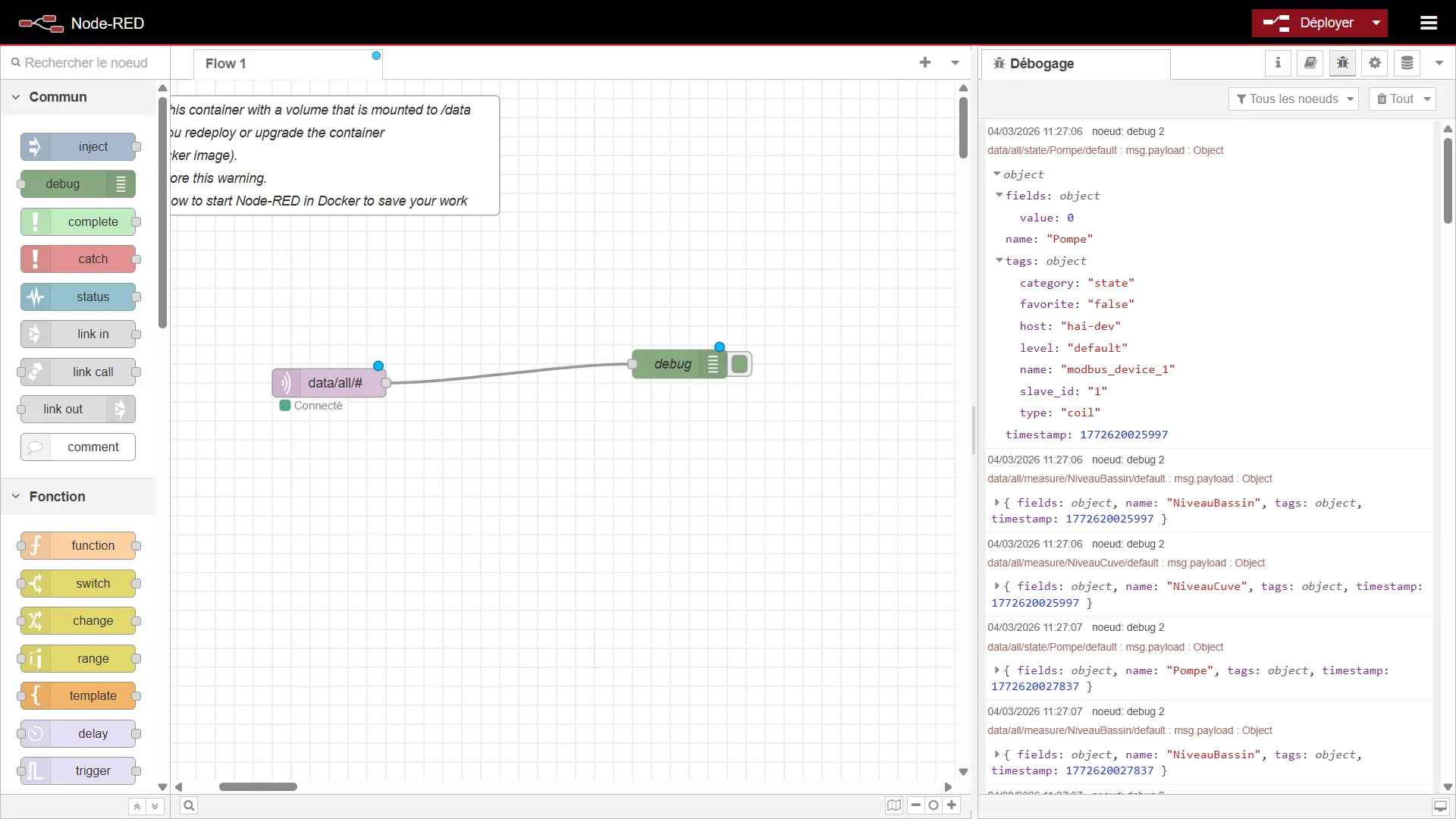
5. Monitoring storage status (internal & external memory)
Section titled “5. Monitoring storage status (internal & external memory)”The controller monitors the free disk space on its internal memory and on any external storage media (a secondary SD card or a USB stick, for instance) in the background. Those statistics are published automatically every 5 minutes on the MQTT broker.
Topic (to listen to): service/storage/status
Generated payload (JSON format):
JSON
{ "internal": { "used": 5495607296, "total": 30158270464, "free": 23380758528, "percent": 19.0 }, "external": { "used": 1073741824, "total": 31914983424, "free": 30841241600, "percent": 3.4 }}6. Finding out the controller’s location
Section titled “6. Finding out the controller’s location”The controller estimates its geographic position from mobile network information and publishes the result every hour on the internal broker. The message is retained: a client that connects receives the last known position immediately.
Topic (to listen to): service/location
{ "latitude": 48.8566, "longitude": 2.3522, "accuracy": 1969, "source": "cell", "resolved_at": "2026-07-30T14:05:12+0200", "provider": "https://..."}- accuracy: the estimated precision, in metres. May be null.
- source: cell when the network cell has been resolved precisely, cell-neighbours when the position is the barycentre of several neighbouring cells — and therefore less precise.
- resolved_at: the date and time of the resolution, in the controller’s local time zone.
- provider: the geolocation service queried.
If the geolocation feature is disabled, the controller clears the retained message and publishes nothing more.