How the portal works
The portal does not replace the box: each has its own role.
Who does what
Section titled “Who does what”| HAI-P200 box (on site) | myHexa portal (online) | |
|---|---|---|
| Measurements | Reads the PLCs and sensors, stores history locally | Shows the live status and the history of the whole fleet |
| Alarms | Detects alarms and notifies its recipients itself | Shows the alarms, sends a notification to the app |
| Configuration | Variables, protocols, network | Alarm recipients, dashboards, reports |
This split is deliberate: the box forwards the alarms, as close to the installation as possible. If the portal goes down, or the internet link between the portal and you is cut, the box still sends its alarms.
The data path
Section titled “The data path”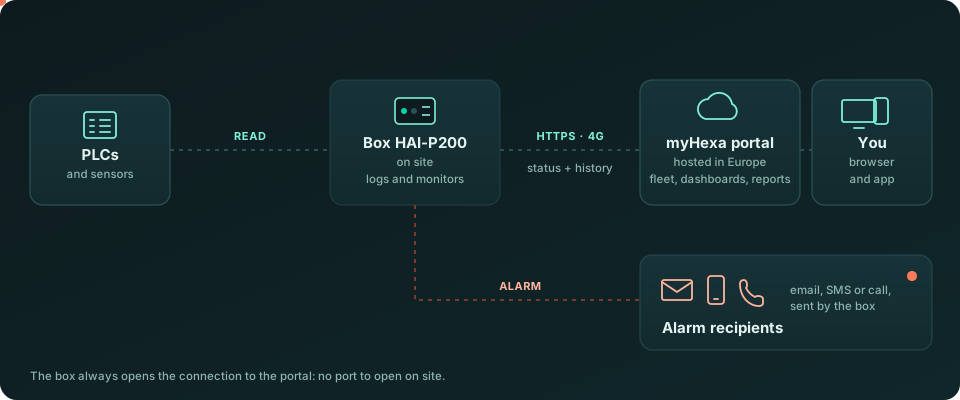
- The PLCs and sensors are read by the HAI-P200 box, on site.
- The box sends its data to the myHexa portal over HTTPS, through 4G or the site network.
- You use the portal from a browser or from the app on your phone. The portal also sends the PDF reports by email.
In parallel, the box itself sends the alarms to its recipients (email, SMS, call, depending on its configuration).
- Live: each box regularly sends its status (current values, active alarms). A box is shown as online if it has reported in within the last hour.
- History: the box sends its records in batches. The portal history therefore fills in with a slight delay compared with the live view.
- Daily report: one summary per day (alarms, counters), which feeds the alarm history and the reports.
The box always initiates the connection to the portal: no port needs to be opened on the site network.
Your data
Section titled “Your data”- Hosted in Europe: the database and the files are hosted in the European Union (Ireland).
- Separation: each company sees only its own boxes. A user sees only the boxes they have access to (see Users and access).
- Encryption: all traffic, from the box and from the browser, goes over HTTPS.
- Controlled sharing: a dashboard shared with another company is read-only, and nothing else in your account is visible (see Share a dashboard).